Blog
-
August 17, 2026
ใน YAMAWA General Catalog หัวข้อ การแก้ไขปัญหาในการต๊าปเกลียว
มีการกล่าวถึง "คราบการเชื่อมติด" ว่าเป็นหนึ่งในสาเหตุของปัญหาที่เกิดขึ้นระหว่างการต๊าป
คราบการเชื่อมติดคืออะไร? มีลักษณะอย่างไร และสามารถสังเกตได้ด้วยตาเปล่าหรือไม่?
ในหัวข้อ การแก้ไขปัญหาในการต๊าปเกลียว คำว่า "คราบการเชื่อมติด"
หมายถึง สภาวะที่วัสดุของชิ้นงานหลอมตัวจากความร้อนที่เกิดขึ้นระหว่างการต๊าป
แล้วไปเกาะติดบนเครื่องมือ เช่น ต๊าปหรือดาย ก่อนจะแข็งตัวบนผิวคมตัดของเครื่องมือ
ในทางวิชาการ ปรากฏการณ์นี้อาจเรียกว่า การยึดติดของวัสดุ
แต่ในเอกสารของ YAMAWA ใช้คำว่า คราบการเชื่อมติด เพื่ออธิบายลักษณะดังกล่าว
ภาพตัวอย่างต่อไปนี้แสดงลักษณะการเกิดคราบการเชื่อมติดที่เกิดขึ้นจริง
เพื่อให้สามารถสังเกตและทำความเข้าใจสภาพของเครื่องมือได้ง่ายยิ่งขึ้น
เมื่อเกิดคราบการเชื่อมติดแล้ว อาจนำไปสู่ปัญหาในการต๊าปเกลียวได้หลายรูปแบบ
เช่น คมตัดบิ่น คมตัดแตก ต๊าปหัก เกลียวไม่ได้ขนาด และผิวเกลียวมีคุณภาพไม่ดี
ดังนั้นจึงควรหมั่นตรวจสอบสภาพของเครื่องมืออย่างสม่ำเสมอ
เพื่อป้องกันปัญหาและรักษาคุณภาพของงานต๊าปเกลียวให้ได้มาตรฐาน
ตัวอย่างการเกิดคราบการเชื่อมติดที่เกิดขึ้นจริง
-
August 10, 2026
เกลียวนอกท่อแบบขนาน G และ PF เหมือนกันหรือแตกต่างกัน?
แล้วควรเลือกใช้ ดายตัดเกลียวท่อแบบขนาน รุ่นใด?
สามารถใช้ YAMAWA Solid Die รุ่น D PF ในการตัดเกลียวทั้ง G และ PF ได้หรือไม่?ในทางปฏิบัติ เกลียวนอกท่อแบบขนาน G และ PF ไม่มีความแตกต่างกัน
สามารถเข้าใจได้ว่า "G" เป็นชื่อเรียกใหม่ที่ใช้แทน "PF" ตามมาตรฐาน JIS ฉบับปัจจุบัน
นอกจากนี้ YAMAWA Solid Die สำหรับเกลียวท่อขนาน รุ่น D PF สามารถใช้ตัดได้ทั้ง
เกลียวนอก PF และเกลียวนอก G โดยไม่ต้องเปลี่ยนรุ่นของดาย
หมายเหตุ: สำหรับความสัมพันธ์ระหว่าง เกลียวใน (Female Thread) และ ต๊าป (Tap) โปรดดู Tips No.058 – ความแตกต่างระหว่าง G และ PF (Part 1)
คำอธิบาย
PF เป็นชื่อเรียกของ เกลียวนอกท่อแบบขนาน ตามมาตรฐาน JIS ฉบับเดิม ส่วนมาตรฐาน JIS ฉบับปัจจุบันได้เปลี่ยนมาใช้ชื่อเรียกว่า G จากการเปรียบเทียบขนาดมาตรฐานของ PF 1/2-14 และ G 1/2-14
จะเห็นได้ว่าค่ามิติ และค่าความคลาดเคลื่อนทั้งหมด เหมือนกันทุกประการ จึงสามารถถือได้ว่าเป็นเกลียวมาตรฐานเดียวกัน เพียงแต่ใช้ชื่อเรียกต่างกันตามการปรับปรุงของมาตรฐาน JISรายการ
ขนาดเกลียวมาตรฐาน JIS เดิม PF 1/2-14 -
August 03, 2026
ระบบ
ระบบการทำงานของ Spot Cooler
Spot Cooler เป็นผลิตภัณฑ์ทำความเย็นโดยใช้ระบบ คอมเพรสเซอร์ ลักษณะเดียวกันกับแอร์บ้าน โดยระบบ คอมเพรสเซอร์จะอัดน้ำยาแอร์ให้อยู่ในรูปของเหลวแรงดันสูง ทำให้เกิดความร้อนขึ้น น้ำยาแอร์ที่ร้อนขึ้นจะไหลไปยัง แผงท่อทองแดง (Condenser) และมีพัดลม พัดอากาศ เพื่อระบายความร้อนออกมาเป็นลมร้อน น้ำยาแอร์ที่เย็นตัวลงแล้วจะผ่าน Capillary Tube (ตัวลดความดัน) ก๊าซที่มีความเย็นนี้จะไหลไปตามแผงท่อทองแดง(Evaporator) ที่มีพัดลมพัดอากาศผ่านซึ่งจะพัดความเย็น ออกมาทางท่อลมเย็น ต่อจากนั้นก๊าซก็จะถูกบีบอัดกลับ เป็นของเหลวดังเดิมที่คอมเพรสเซอร์วนต่อไปเรื่อยๆ
ถังน้ำทิ้ง
เมื่อเปรียบเทียบกับ Model เก่า สามารถลดปริมาณน้ำทิ้งได้ 18 เท่า
ถังน้ำทิ้งเล็กลงจากเดิม 90% สภาพแวดล้อมขณะวัด : อุณหภูมิ 35 องศาเซลเซียส ความชื้น 60%
Drain amount (cc/h) Tank capacity Previous model 1800 20L Current model 100 5L ท่อต่อขยายท่อลมร้อน/เย็น
หมายเหตุ :ควรใช้ท่อต่อขยาย 1 ท่อ / เครื่อง
1. ท่อต่อขยายลมเย็น เหมาะสำหรับใช้ตอน วางเครื่องใกล้ๆไม่ได้
2. ท่อต่อขยายลมร้อน ควรมีจุดโค้งงอของท่อ เพียงจุดเดียว
-
August 03, 2026
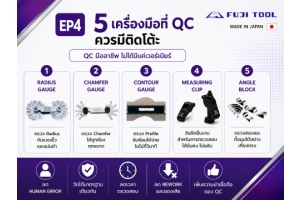
5 เครื่องมือวัดที่ฝ่าย QC ควรมีติดโต๊ะ
เครื่องมือพื้นฐานที่ช่วยลดความผิดพลาด เพิ่มความแม่นยำ และยกระดับการควบคุมคุณภาพ
ในงานผลิตแม่พิมพ์ (Mold & Die) และชิ้นส่วนที่ต้องการความเที่ยงตรงสูง การควบคุมคุณภาพไม่ได้ขึ้นอยู่กับการใช้เครื่องมือวัดราคาแพงเพียงอย่างเดียว แต่ขึ้นอยู่กับการเลือกใช้
เครื่องมือที่เหมาะสมกับลักษณะงาน และสามารถตรวจสอบได้อย่างรวดเร็วในทุกขั้นตอนของการผลิต
หลายโรงงานมีเครื่อง CMM หรือ Vision Measuring System สำหรับการตรวจสอบขั้นสุดท้าย แต่การตรวจสอบระหว่างกระบวนการผลิต (In-Process Inspection)
ยังคงต้องอาศัยเครื่องมือวัดเฉพาะทางที่ใช้งานง่าย รวดเร็ว และให้ผลลัพธ์ที่เชื่อถือได้
บทความนี้รวบรวม 5 เครื่องมือวัดจาก FUJI TOOL ที่ฝ่าย QC และผู้ปฏิบัติงานควรมีติดโต๊ะ เพื่อช่วยลดของเสีย เพิ่มประสิทธิภาพ และลดเวลาการตรวจสอบ
1. Radius Gauge
ตรวจสอบรัศมี (Radius) ได้อย่างรวดเร็ว
การตรวจสอบ Radius มีความสำคัญต่อคุณภาพของแม่พิมพ์และชิ้นงาน หากรัศมีไม่ตรงตามแบบ อาจส่งผลให้การประกอบไม่สมบูรณ์ เกิดการสึกหรอ หรือทำให้ชิ้นงานไม่เป็นไปตามข้อกำหนด
ข้อดี
• ตรวจสอบได้ทันที
• ใช้งานง่าย
-
August 03, 2026
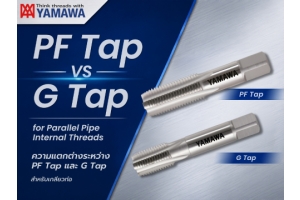
เกลียวท่อขนานตัวเมีย G และ PF เหมือนกันหรือแตกต่างกัน?
แล้วควรเลือกใช้ต๊าปเกลียวท่อชนิดใดในการต๊าปเกลียว?
เนื่องจากมีทั้ง PF Tap และ G Tap จึงควรเลือกใช้แบบไหน?โดยพื้นฐานแล้ว เกลียวท่อขนานตัวเมียแบบ G และ PF เป็นเกลียวชนิดเดียวกัน กล่าวได้ว่า G เป็นชื่อเรียก
ตามมาตรฐาน JIS ปัจจุบันที่ใช้แทน PF ซึ่งเป็นชื่อเรียกตามมาตรฐานเดิมสำหรับต๊าปเกลียวท่อขนานของ
YAMAWA รุ่น PF Tap และ G Tap แม้ว่าจะมี ความยาวรวม และความยาวส่วนเกลียว แตกต่างกัน
แต่ทั้งสองรุ่นมีระดับความแม่นยำของเกลียว (Class II / Grade 2) เท่ากัน จึงสามารถใช้ต๊าปเกลียวตัวเมีย
แบบ PF และ G ได้เหมือนกัน และใช้ทดแทนกันได้.
*สำหรับความสัมพันธ์ระหว่างเกลียวนอกและดาย โปรดดู Tips No.059 เรื่อง "ความแตกต่างระหว่าง G และ PF – ตอนที่ 2"
คำอธิบาย
PF เป็นสัญลักษณ์กำหนดขนาดของ เกลียวท่อขนานตัวเมีย ตามมาตรฐาน JIS เดิมในมาตรฐาน JIS ปัจจุบันได้เปลี่ยนมาใช้สัญลักษณ์ G แทน อย่างไรก็ตาม เกลียวตัวเมีย PF เกรด B ที่เคยมีอยู่ในมาตรฐานเดิมไม่ได้ถูกรวมอยู่ในมาตรฐาน G อีกต่อไปเพื่อประกอบความเข้าใจ
ตารางด้านล่างแสดงขนาดมาตรฐานของเกลียวตัวเมีย -
July 30, 2026
เกจวัดรูสำหรับรูตัน
รุ่นใหม่วัดเส้นผ่านศูนย์กลางรูตันด้วยความแม่นยำสูงและมีความทนทานสูง
คุณสมบัติ
-สามารถวัดขนาดเส้นผ่านศูนย์กลางภายใน (ID) ได้ใกล้กับก้นรู
-โครงสร้างไกด์แบบลูกตุ้มช่วยให้การเลื่อนตำแหน่งทำได้ราบรื่น
-ผิวสัมผัสทำจากคาร์ไบด์เพื่อความทนทาน
-ด้ามจับมีขนาดใหญ่และเป็นโพรงกลวง เพื่อลดผลกระทบจากความร้อนของร่างกายที่มีต่อความแม่นยำในการวัด
-สามารถต่อก้านขยาย (อุปกรณ์เสริม) เพื่อใช้วัดรูที่มีความลึกได้
-มีอุปกรณ์ตรวจสอบเกจวัดรูในและริงเกจ (สินค้าเสริม ต้องสั่งซื้อเพิ่ม) หลากหลายขนาดไว้สำหรับช่วยในการตั้งค่าเกจให้มีความแม่นยำก่อนเริ่มทำการวัด
-อาจใช้ตัวชี้วัดอื่นแทนตัวชี้วัดที่แนะนำไว้ได้*
*อินดิเคเตอร์และฝาครอบป้องกันบางรุ่นไม่สามารถใช้งานร่วมกับเกจวัดรูในเหล่านี้ได้ โปรดติดต่อสำนักงานขายของ Mitutoyo หากท่านต้องการใช้อินดิเคเตอร์แบบ Dial หรือ Digimatic รุ่นอื่นนอกเหนือจากรุ่นที่แนะนำ
ข้อมูลจำเพาะ
Metric
รหัสสินค้า ช่วง(มม.)
ระยะชักของหัวสัมผัส (มม.) ความแม่นยำ*
(µm)
ความสามารถในการทำซ้ำ*
(µm)
ค่าความคลาดเคลื่อน*ระหว่างชิ้นงานที่อยู่ติดกัน
(µm)
แรงในการวัด (N) แรงกดของตัวนำทาง -
July 24, 2026
เกลียวในท่อแบบขนาน "Rp" และ "PS" เป็นเกลียวชนิดเดียวกันหรือแตกต่างกัน?
และควรเลือกใช้ต๊าปเกลียวท่อแบบใดในการทำเกลียวเหล่านี้?
ในแค็ตตาล็อก YAMAWA มีทั้ง Rp Tap และ PS Tap อยู่ 2 ประเภท แล้วทั้งสองแบบแตกต่างกันอย่างไร
และควรเลือกใช้แบบใด?เกลียวในท่อแบบขนาน "Rp" และ "PS" โดยพื้นฐานแล้ว ไม่มีความแตกต่างกันในทางปฏิบัติ
สามารถเข้าใจได้ง่าย ๆ ว่า ชื่อเรียกของเกลียวถูกเปลี่ยนจาก "PS" มาเป็น "Rp" ตามมาตรฐานปัจจุบัน
นอกจากนี้ ต๊าปเกลียวท่อแบบขนานของ YAMAWA ทั้ง Rp Tap และ PS Tap
แม้ว่าจะมีความแตกต่างกันในด้าน ความยาวรวมของต๊าป และความยาวส่วนเกลียว
แต่มีระดับความแม่นยำ เท่ากัน
ดังนั้นจึงสามารถใช้ต๊าปทั้งสองประเภทสำหรับการทำเกลียวในท่อแบบขนาน Rp และ PS ได้เช่นเดียวกัน
โดยสามารถใช้งานทดแทนกันได้อย่างไม่มีปัญหา
คำอธิบาย
"PS" เป็นสัญลักษณ์เรียกเกลียวในท่อแบบขนานตาม มาตรฐาน JIS เดิม ส่วนใน มาตรฐาน JIS ปัจจุบัน ได้เปลี่ยนมาใช้สัญลักษณ์ "Rp"
เพื่อเป็นข้อมูลอ้างอิง ขนาดมาตรฐานของเกลียวใน PS1/2-14 และ Rp1/2-14 ได้แสดงไว้ในตารางด้านล่าง ซึ่งจะเห็นได้ว่าทั้งสองแบบมี ขนาดและค่ามาตรฐานเหมือนกันทุกประการ -
July 23, 2026
JSR Group (บริษัท จ.ศรีรุ่งเรืองอิมเป็กซ์ จำกัด และ บริษัท ศรีรุ่งเรืองแมชชีนแอนด์ทูลส์ จำกัด) ถือเป็นหนึ่งในพันธกิจของ JSR Group และตระหนักในการให้ความสำคัญกับความรับผิดชอบต่อสังคมอย่างยั่งยืนควบคู่ไปกับการดำเนินเนินธุรกิจ โดยเป็นส่วนหนึ่งในการร่วมมอบเงินสนับสนุนมูลนิธิหัวใจแห่งประเทศไทย ในพระบรมราชูปถัมภ์ มุ่งพัฒนาคุณภาพชีวิตแก่ผู้ป่วยโรคหัวใจ เป็นจำนวนเงิน 100,000 บาท
ด้วยโอกาสอันเป็นมหามงคลและพระมหากรุณาธิคุณ คุณอลงกต จิโรจจาตุรนต์ ผู้จัดการทั่วไป ในฐานะผู้แทนของกลุ่มบริษัท JSR Group ได้รับโอกาสเข้าเฝ้าทูลละอองพระบาทรับพระราชทานเข็มที่ระลึกจาก สมเด็จพระกนิษฐาธิราชเจ้า กรมสมเด็จพระเทพรัตนราชสุดาฯ สยามบรมราชกุมารี เมื่อวันที่ 21 กรกฎาคม 2569 ที่ผ่านมา ในระหว่างการประชุมใหญ่สามัญประจำปี ครั้งที่ 44 ของมูลนิธิหัวใจแห่งประเทศไทยฯ ณ อาคารเฉลิมพระบารมี 50 ปี ซอยศูนย์วิจัย ถนนเพชรบุรีตัดใหม่
JSR Group ขอเป็นส่วนหนึ่งในการส่งต่อโอกาส ความห่วงใย และคุณภาพชีวิตที่ดีให้แก่สังคม พร้อมมุ่งมั่นการดำเนินธุรกิจด้วยความรับผิดชอบต่อสังคมอย่างต่อเนื่องและยั่งยืน
-
July 23, 2026
Contour Gauge ช่วยลดเวลาตรวจสอบ Mold ได้อย่างไร?
เพิ่มประสิทธิภาพการตรวจสอบรูปทรงชิ้นงาน พร้อมลดเวลาการทำงานได้มากกว่า 80%
การตรวจสอบ Contour หรือ Profile ของชิ้นงาน เป็นหนึ่งในขั้นตอนที่ใช้เวลามากที่สุดในงานผลิตแม่พิมพ์ (Mold & Die) และชิ้นส่วนที่มีรูปทรงซับซ้อน
หากใช้วิธีการวัดแบบเดิม ไม่ว่าจะเป็นการเทียบกับแบบ การสร้าง Template หรือการส่งชิ้นงานเข้าเครื่อง CMM ทุกครั้ง ย่อมทำให้เสียเวลาและเพิ่มต้นทุนการผลิตโดยไม่จำเป็น
FUJI TOOL Contour Gauge ถูกออกแบบมาเพื่อช่วยให้การตรวจสอบ Profile เป็นเรื่องง่าย รวดเร็ว และแม่นยำ เหมาะสำหรับการตรวจสอบหน้างาน (In-Process Inspection) ก่อนเข้าสู่กระบวนการถัดไป
ทำไมการตรวจสอบ Profile จึงใช้เวลานาน?
ชิ้นงานหลายประเภท เช่น
• Mold Core
• Mold Cavity
• Press Die
• Punch & Die
• Electrode
• Plastic Parts
มักมีรูปทรงโค้งและพื้นผิวที่ไม่สามารถวัดได้ด้วยเครื่องมือทั่วไป เช่น เวอร์เนียร์ หรือไมโครมิเตอร์
หลายโรงงานจึงเลือกใช้วิธี
• สร้าง Template สำหรับเปรียบเทียบ
• วัดด้วย CMM
• ตรวจสอบด้วย Vision Measuring System
แม้ว่าวิธีเหล่านี้จะให้ผลลัพธ์ที่แม่นยำ
-
July 20, 2026
ความสัมพันธ์ระหว่างเกลียวท่อเทเปอร์ตัวเมีย "Rc" และ "PT" รวมถึงต๊าปเกลียวท่อ "PT", "S-PT" และ "Rc"
ได้เข้าใจมากขึ้นแล้วจากบทความ Tips No.055 : ความแตกต่างระหว่าง Rc และ PT
ขอทราบเพิ่มเติมเกี่ยวกับ ความแตกต่างระหว่างเกลียวท่อเทเปอร์ตัวผู้ "R" และ "PT"
และดายทำเกลียวท่อเตเปอร์แบบโซลิดไดซ์ "D PT" ช่วยอธิบายเพิ่มเติมให้ด้วยเกลียวท่อเทเปอร์ตัวผู้ "R" และ "PT" ในทางปฏิบัติแล้ว แทบไม่มีความแตกต่างกัน
สามารถเข้าใจได้ว่าเป็นเพียงการเปลี่ยนชื่อเรียกจาก "PT" เป็น "R" ตามการปรับปรุงมาตรฐานเท่านั้น
สำหรับความสัมพันธ์ระหว่างเกลียวท่อเทเปอร์ตัวผู้ "R" และ "PT" รวมถึงความสัมพันธ์กับดายทำเกลียวท่อเตเปอร์
สามารถดูรายละเอียดได้จากคำอธิบายด้านล่าง
คำอธิบาย
เกลียวท่อเทเปอร์ตัวผู้ ในมาตรฐาน JIS รุ่นเดิม จะใช้สัญลักษณ์ "PT" ในการระบุขนาดเกลียว เช่น PT1/2-14, PT3/4-14, PT1-11
อย่างไรก็ตาม ในมาตรฐาน JIS ฉบับปัจจุบัน ได้เปลี่ยนมาใช้สัญลักษณ์ "R" เช่น R1/2-14, R3/4-14, R1-11
แม้ว่าชื่อเรียกจะเปลี่ยนจาก PT เป็น R แต่ขนาดและรูปทรงของเกลียวตัวผู้ยังคงเหมือนเดิมทุกประการ ดังนั้น PT1/2-14 และ R1/2-14
Recent Posts